Module 4: Azure OpenAI & AI Foundry
Configure AI Foundry project and deploy GPT-4 model
Module 4: Azure OpenAI & AI Foundry
Duration: 45 minutes
Objective: Set up Azure AI Foundry project, deploy GPT-4 model, and implement intelligent conversation analysis.
🎯 Learning Objectives
By the end of this module, you will:
- Understand the difference between Azure OpenAI and Azure AI Foundry
- Validate your Foundry project and model deployment from Module 1
- Navigate the Foundry portal (Playground, Evaluation, Metrics, Tracing)
- Understand how CORA’s agent uses your deployed model
- Learn the 5-criteria conversation scoring system
- Explore OpenTelemetry integration and traces
- Test and troubleshoot AI-powered conversation analysis
� Prerequisites Check
Before starting, ensure Module 1 is complete:
- ✅ Azure AI Foundry project created
- ✅ GPT-4o model deployed
- ✅ Endpoint URL saved
- ✅ Model deployment name recorded
Quick verification:
# Check your environment variables from Module 1
azd env get-values | grep AZURE_OPENAI
You should see:
AZURE_OPENAI_ENDPOINT- Your Foundry endpoint URLAZURE_OPENAI_DEPLOYMENT_NAME- Your model name (e.g., “gpt-4o”)AZURE_OPENAI_API_VERSION- API version (2024-08-01-preview)
🧠 Understanding Azure AI Foundry
What is Azure AI Foundry?
Azure AI Foundry (formerly Azure AI Studio) is Microsoft’s comprehensive platform for building, evaluating, and deploying AI applications.
Think of it as:
- Visual Studio Code for AI development
- A unified workspace for all your AI projects
- An end-to-end AI lifecycle management platform
Foundry vs Standalone Azure OpenAI
| Feature | Azure OpenAI Service | Azure AI Foundry |
|---|---|---|
| Model Deployment | ✅ Yes | ✅ Yes |
| Playground Testing | ✅ Basic | ✅ Advanced with comparisons |
| Prompt Flow | ❌ No | ✅ Visual workflow designer |
| Built-in Evaluation | ❌ No | ✅ Multi-metric analysis |
| RAG (Retrieval) | ❌ Manual setup | ✅ Built-in vector search |
| Content Safety | ⚠️ Separate service | ✅ Integrated |
| Trace & Debug | ⚠️ External tools | ✅ Built-in tracing UI |
| Team Collaboration | ❌ No | ✅ Shared projects |
Bottom line: For serious AI development, Foundry provides everything you need in one place.
Key Components
1. Project 📁
- Individual AI application workspace
- Contains: deployments, data, evaluations, traces
- Isolated from other projects
- Think: “Git repository for one app”
- This is what you created in Module 1
2. Deployments 🚀
- Running model instances (GPT-4o, embeddings, etc.)
- Configured with quotas and regions
- RESTful API endpoints
- Think: “Running web server”
- You deployed gpt-4o in Module 1
3. Connections 🔗
- Links to external resources (Storage, Search, DBs)
- Secure credential management
- Reusable across projects
- Think: “Connection strings vault”
- We don’t use external connections in this training
Note about Hubs: Azure AI Foundry has organizational containers called “Hubs” that can group multiple projects together for enterprise scenarios. For this training, we’re focused on a single Project - which is all you need for most applications!
🌐 Exploring the Foundry Portal
Accessing Your Project
- Go to ai.azure.com or oai.azure.com
- Sign in with your Azure account
- Select your project (created in Module 1)
Portal Experience Toggle 🔄
Important: Azure AI Foundry has two portal experiences, and you can switch between them:
- Legacy Portal (oai.azure.com): Classic UI with familiar layout
- New Portal (ai.azure.com): Modern UI with updated navigation
Look for the toggle at the top of the screen:
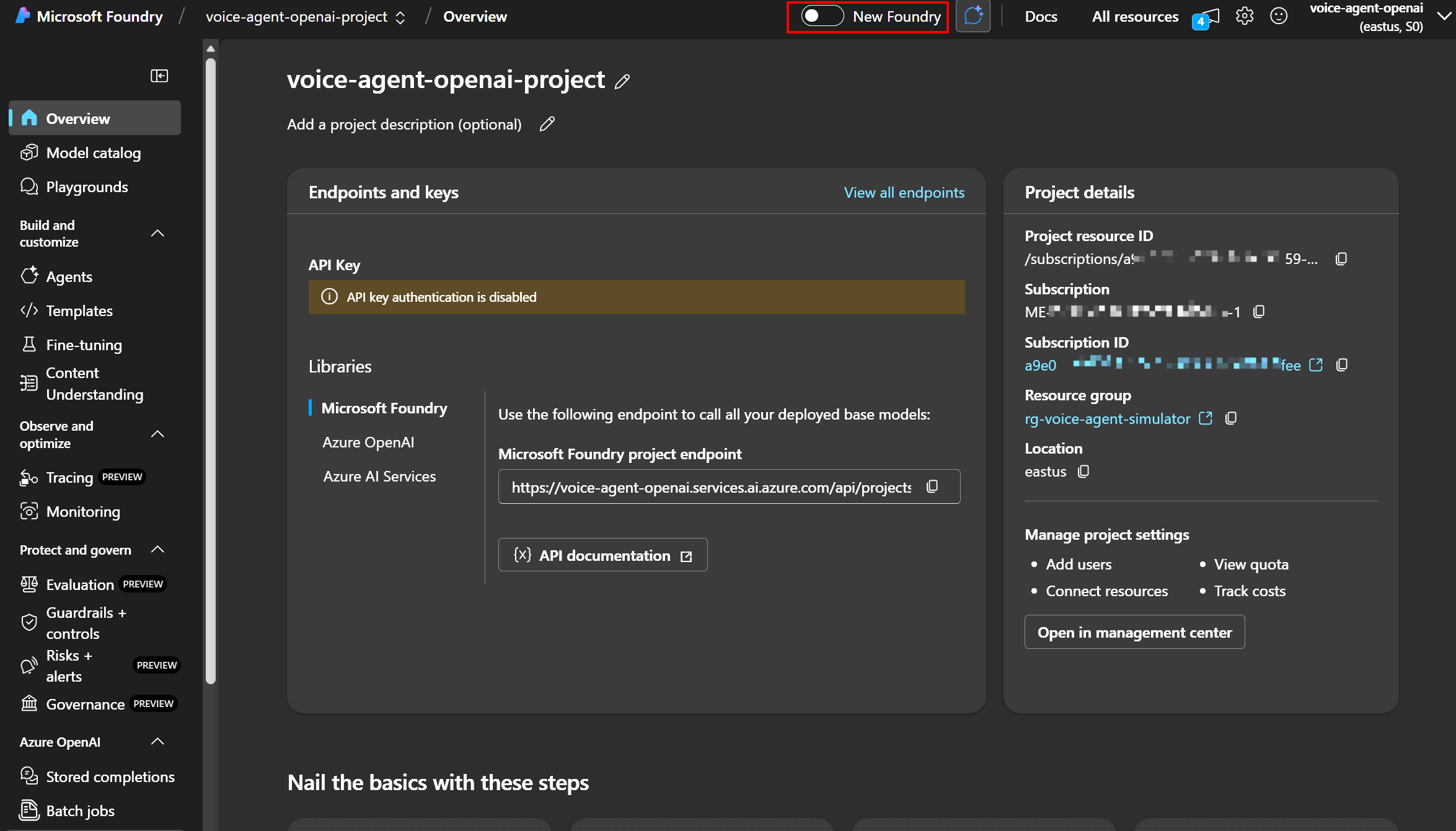
Click to enlarge
For this training: Our screenshots use the legacy experience for consistency, but both work identically!
Portal Interface Tour
Left Navigation Menu
| Section | What’s There | When to Use |
|---|---|---|
| Deployments | Your GPT-4o model | Check status, edit settings |
| Playground | Interactive testing | Try prompts, adjust parameters |
| Evaluation | Quality metrics | Assess model performance |
| Tracing | Request logs | Debug API calls |
| Metrics | Usage statistics | Monitor tokens, costs |
| Safety | Content filters | Configure moderation |
| Data | Training datasets | Upload custom data |
Finding Your Model Details
- Click “Deployments” in left menu
- Find your deployment (e.g.,
gpt-4o) - Note these details:
Deployment name: gpt-4o
Model: GPT-4o (2024-08-06)
Region: East US
Tokens per minute: 150,000
Status: Running ✅
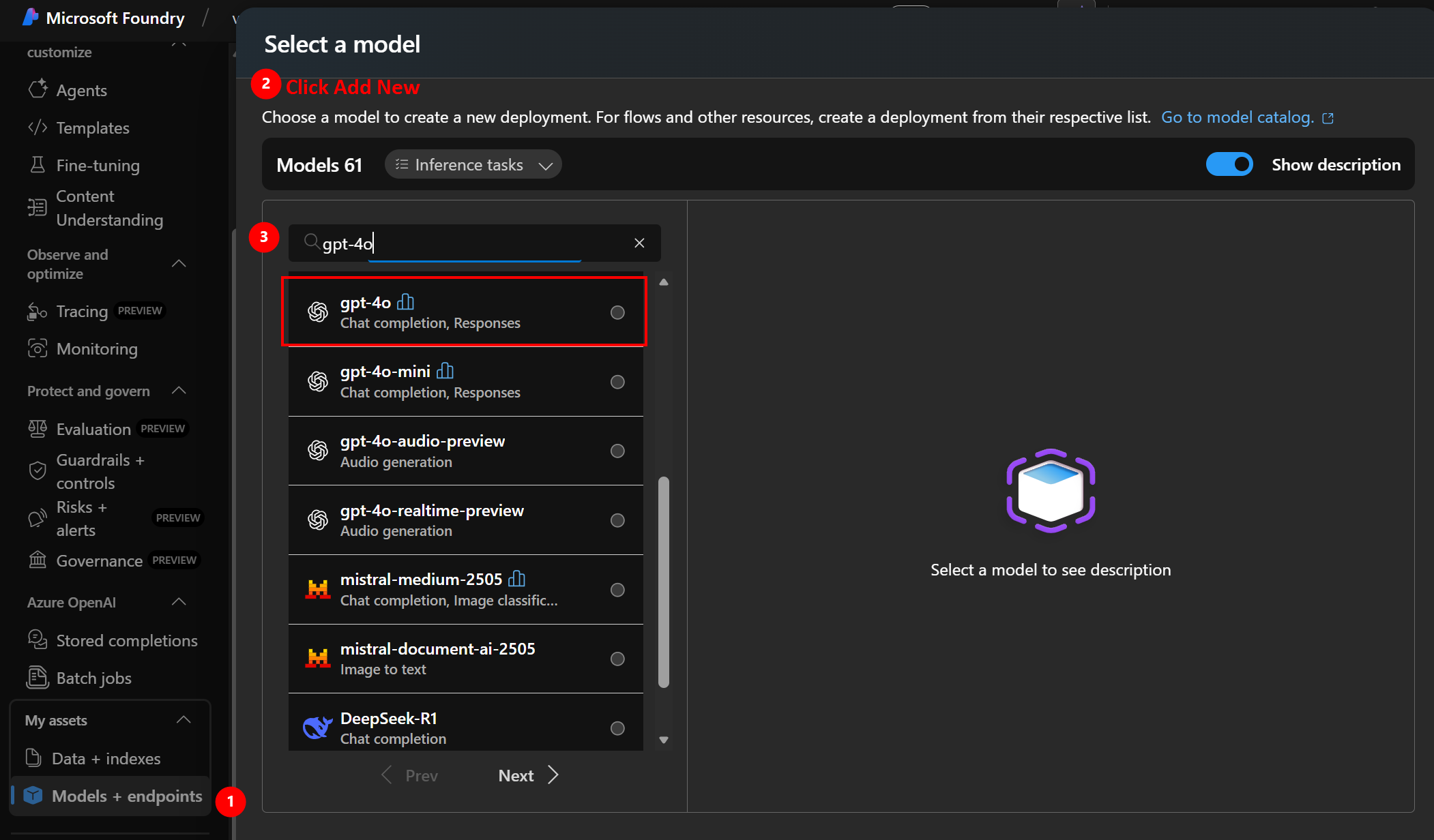
Click to enlarge
- Click deployment name to see:
- Endpoint URL (already saved in Module 1)
- API Version
- Quota usage
- Request metrics
🎮 Testing Your Model in Playground
Access the Playground
- Click “Playground” → “Chat”
- Select your deployment from dropdown
- You’ll see three panels:
- System message (left) - Instructions for the AI
- Chat session (center) - Conversation area
- Configuration (right) - Parameters
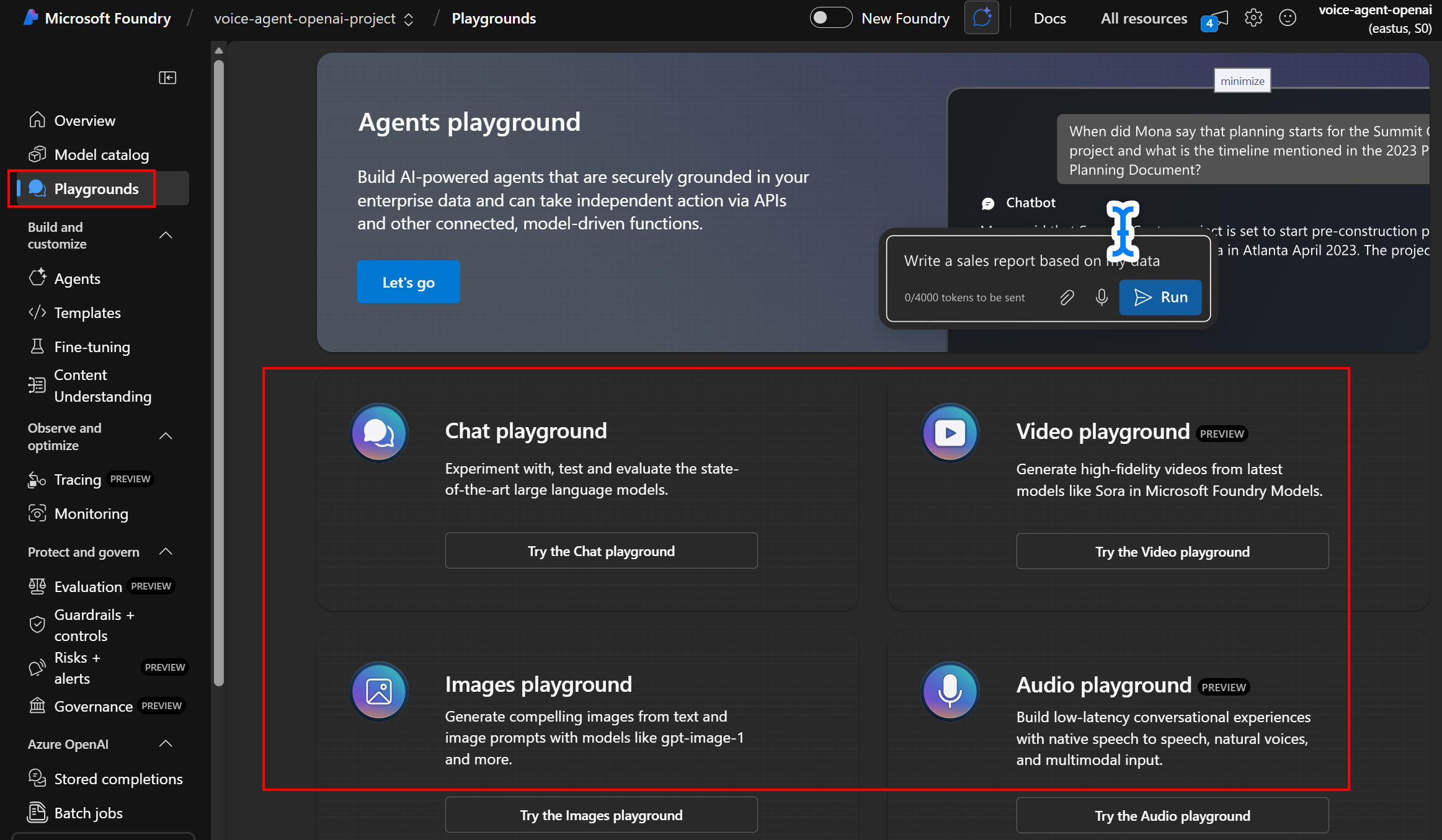
Click to enlarge
Understanding Model Parameters
Temperature (0.0 - 2.0)
What it controls: Randomness and creativity
| Value | Behavior | Best For |
|---|---|---|
| 0.0 - 0.3 | Focused, deterministic | Code generation, math, factual Q&A |
| 0.4 - 0.7 | Balanced | General conversation, customer service |
| 0.8 - 1.5 | Creative, varied | Storytelling, brainstorming |
| 1.6 - 2.0 | Very random | Experimental, artistic |
CORA uses: 0.7 (balanced for customer simulation)
Max Tokens (1 - 16,000)
What it controls: Response length limit
- GPT-4o can handle up to 128,000 input tokens
- Output limited by
max_tokenssetting - 1 token ≈ 0.75 words (English)
CORA uses: 800 tokens (≈600 words, good for conversations)
Top P (0.0 - 1.0)
What it controls: Vocabulary diversity (nucleus sampling)
- Lower values = more focused word choices
- Higher values = more diverse vocabulary
- Alternative to temperature
CORA uses: 0.95 (default, allows natural variety)
Try a Test Conversation
System Message:
You are a frustrated customer calling about a delayed package. You're upset but looking for a resolution. Stay in character throughout the conversation.
User Message:
Hi, I'm calling about my order #12345. It was supposed to arrive three days ago and I still don't have it!
Expected Response: The AI should respond as an upset customer, expressing frustration while seeking help.
Experiment:
- Change temperature to 0.2 (more consistent)
- Change temperature to 1.5 (more varied)
- Notice how responses differ!
🤔 Why GPT-4o? Model Selection Explained
Why Chat Completion Models?
Before we dive into specific models, let’s understand why we need chat completion models for CORA:
What are Chat Completion Models?
- Models designed for conversational AI (back-and-forth dialogue)
- Maintain context across multiple messages
- Understand roles: system (instructions), user (customer), assistant (CORA)
- Generate human-like responses in conversation format
Why Perfect for Customer Service Simulation:
✅ Multi-turn conversations - Customers rarely resolve issues in one message ✅ Context awareness - Remember what was said earlier (“As I mentioned before…”) ✅ Role-playing capability - Can embody different personalities (frustrated, polite, confused) ✅ Natural dialogue flow - Feels like talking to a real person, not a search engine ✅ Emotional intelligence - Detect and respond to customer sentiment
Alternatives (and why they don’t work for CORA):
| Model Type | Good For | Why NOT for CORA |
|---|---|---|
| Text Completion (legacy) | Code generation, text continuation | No conversation structure, no roles |
| Embeddings | Semantic search, similarity | Doesn’t generate responses |
| Fine-tuned Classification | Sentiment analysis, categorization | Can’t create natural dialogue |
| Instruct Models | Single Q&A, tasks | Limited multi-turn context |
| Chat Completion ✅ | Conversational AI | Perfect for customer service! |
Bottom Line: Chat completion models like GPT-4o are specifically engineered for the kind of natural, multi-turn, context-aware conversations that customer service requires. Using anything else would be like using a hammer to paint a wall! 🎨🔨
The Model Landscape
| Model | Released | Context | Speed | Cost | Best For |
|---|---|---|---|---|---|
| GPT-5 | Late 2024 | 128K | Fast | \(\) | Cutting-edge research, complex reasoning |
| GPT-4o | May 2024 | 128K | ⚡ Fast | $$ | Balanced performance + cost |
| GPT-4 Turbo | Nov 2023 | 128K | Medium | $$$ | Deep analysis, complex tasks |
| GPT-4 | Mar 2023 | 8K/32K | Slow | \(\) | Legacy applications |
| GPT-3.5 Turbo | Mar 2023 | 16K | ⚡⚡ Fastest | $ | Simple chat, high volume |
Why We Chose GPT-4o for CORA
1. Optimal Balance ⚖️
- Fast enough for real-time conversations
- Smart enough for nuanced customer personalities
- Affordable for training/development
2. Multimodal Ready 🎤👁️
- Native audio understanding (future feature!)
- Vision capabilities (could analyze screenshots)
- Text output for voice synthesis
3. Cost Efficiency 💰
Per 1M tokens:
- GPT-5: ~$30 input / $60 output
- GPT-4o: $2.50 input / $10 output ✅
- GPT-4 Turbo: $10 input / $30 output
For 1,000 conversations (avg 500 tokens each):
- GPT-5: ~$35
- GPT-4o: ~$6 ✅
- GPT-3.5 Turbo: ~$0.50
4. Response Quality ⭐
For customer service simulation:
- GPT-3.5 Turbo: Too simple, responses feel robotic
- GPT-4o: Perfect balance, natural conversations ✅
- GPT-4 Turbo: Slightly better, but 3x slower
- GPT-5: Best quality, but overkill + expensive
When to Consider Other Models
Use GPT-5 when:
- ✅ Budget is not a concern
- ✅ Need cutting-edge reasoning (complex logic, math)
- ✅ Research or premium customer-facing products
- ✅ Multi-step planning and chain-of-thought tasks
Use GPT-4 Turbo when:
- ✅ Need absolute best quality (worth the cost)
- ✅ Complex document analysis
- ✅ Slower response time is acceptable
Use GPT-3.5 Turbo when:
- ✅ Very high volume (millions of requests)
- ✅ Simple Q&A or classification
- ✅ Speed is critical (near-instant responses)
- ✅ Tight budget constraints
Why NOT GPT-5 for CORA:
- ❌ 5x more expensive ($30 vs $6 per 1K conversations)
- ❌ Quality improvement not noticeable for customer sim
- ❌ Training costs would be prohibitive
- ❌ GPT-4o is “good enough” for learning
Pro Tip: Start with GPT-4o. If responses aren’t meeting quality standards, then consider upgrading. For most use cases, GPT-4o is the sweet spot! 🎯
🤖 How CORA Uses Your Model
The Agent Architecture
Let’s explore agent.py - the brain of CORA.
1. Initialization (__init__)
class VoiceAgent:
    def __init__(self):
        # Connect to Azure OpenAI
        self.client = AzureOpenAI(
            azure_endpoint=os.getenv('AZURE_OPENAI_ENDPOINT'),
            api_key=os.getenv('AZURE_OPENAI_API_KEY'),  # or use Managed Identity
            api_version="2024-08-01-preview"
        )
What happens:
- Reads endpoint URL from environment variable (set in Module 2)
- Authenticates using API key OR Managed Identity
- Connects to your deployed GPT-4o model
Authentication Methods:
| Method | When to Use | Security |
|---|---|---|
| API Key | Local development, testing | ⚠️ Must protect key |
| Managed Identity | Azure deployment (Container Apps) | ✅ No secrets in code |
CORA uses both:
- API key for local dev
- Managed Identity in production (automatically set by azd)
2. Processing Messages (process_message)
async def process_message(self, user_message: str, mood: str = "neutral"):
    # 1. Build system prompt based on mood
    system_prompt = self._get_mood_prompt(mood)

    # 2. Call Azure OpenAI
    response = self.client.chat.completions.create(
        model="gpt-4o",
        messages=[
            {"role": "system", "content": system_prompt},
            {"role": "user", "content": user_message}
        ],
        temperature=0.7,
        max_tokens=800
    )

    # 3. Return response
    return response.choices[0].message.content
Key Steps:
Step 1: Mood-Based System Prompts
Each mood changes how CORA behaves:
mood_contexts = {
    "happy": "You are a happy and satisfied customer. You're pleased with service, speak positively, and express gratitude.",

    "frustrated": "You are a frustrated and upset customer. You've had a bad experience, express disappointment or anger.",

    "confused": "You are a confused customer who doesn't fully understand. You need clear explanations and may ask for clarification multiple times.",

    # ... 6 moods total
}
Why this matters: The same user message gets different responses based on mood!
User: “How can I help you today?”
| Mood | CORA’s Response |
|---|---|
| Happy | “Hi! I’m actually calling to say thank you - your team was amazing!” |
| Frustrated | “Well, it’s about time someone answered! I’ve been waiting forever…” |
| Confused | “Um, hi… I’m not really sure how this works. Can you explain?” |
Step 2: API Call
response = self.client.chat.completions.create(
    model=os.getenv('AZURE_OPENAI_DEPLOYMENT_NAME'),  # "gpt-4o"
    messages=[...],
    temperature=0.7,
    max_tokens=800,
    top_p=0.95
)
What gets sent:
- Your deployment name (not “gpt-4o” - your specific deployment!)
- Conversation history (system + user messages)
- Parameters (temperature, tokens, etc.)
What comes back:
{
    "choices": [{
        "message": {
            "role": "assistant",
            "content": "Well, it's about time someone answered!..."
        }
    }],
    "usage": {
        "prompt_tokens": 145,
        "completion_tokens": 67,
        "total_tokens": 212
    }
}
Step 3: Token Tracking
result = {
    "response": response.choices[0].message.content,
    "tokens": {
        "prompt": response.usage.prompt_tokens,
        "completion": response.usage.completion_tokens,
        "total": response.usage.total_tokens
    }
}
Why track tokens?
- Cost: GPT-4o charges per token
- Optimization: Identify expensive conversations
- Limits: Avoid quota exhaustion
Example costs:
- 1 conversation (500 tokens): ~$0.006
- 1,000 conversations: ~$6
- 100,000 conversations: ~$600
📊 Conversation Analysis & Scoring
The 5-Criteria Evaluation System
CORA uses a standardized scoring method to evaluate agent performance.
Evaluation Criteria
Each scored 1-5 (Total: 25 points possible)
1. Professionalism & Courtesy (1-5)
- Tone, respect, politeness
- Professional language
- No slang or inappropriate terms
2. Communication Clarity (1-5)
- Clear explanations
- Easy to understand
- Avoids jargon or explains technical terms
3. Problem Resolution (1-5)
- Addressed customer needs
- Provided actionable solutions
- Followed through on commitments
4. Empathy & Active Listening (1-5)
- Showed understanding of concerns
- Acknowledged emotions
- Personalized responses
5. Efficiency & Responsiveness (1-5)
- Timely responses
- Concise answers
- Stayed on topic
How It Works (analyze_interaction)
def analyze_interaction(self, conversation: List[Dict]) -> Dict:
    # 1. Format conversation for analysis
    conversation_text = self._format_conversation(conversation)

    # 2. Send to GPT-4o for evaluation
    analysis_prompt = f"""
    You are a customer service quality evaluator.

    Analyze this conversation and score using 5 criteria (1-5 each):
    {conversation_text}

    Return JSON with scores, strengths, improvements, and feedback.
    """

    # 3. Parse JSON response
    response = self.client.chat.completions.create(
        model="gpt-4o",
        messages=[{"role": "user", "content": analysis_prompt}]
    )

    analysis = json.loads(response.choices[0].message.content)
    return analysis
Example Analysis Output
Input Conversation:
Agent: Hi! How can I help you today?
Customer (Frustrated): My package was supposed to arrive 3 days ago!
Agent: I'm sorry to hear that. Let me look into this for you right away.
Customer: Finally, someone who cares!
Output:
{
    "scores": {
        "professionalism": 5,
        "communication": 4,
        "problem_resolution": 4,
        "empathy": 5,
        "efficiency": 4
    },
    "total_score": 22,
    "strengths": [
        "Showed immediate empathy and concern",
        "Professional and courteous throughout",
        "Took prompt action to resolve issue"
    ],
    "improvements": [
        "Could provide estimated resolution timeframe",
        "Offer proactive updates on package status",
        "Provide alternative solutions if package is lost"
    ],
    "overall_feedback": "The agent demonstrated excellent empathy and professionalism. Quick acknowledgment of the issue helped de-escalate the frustrated customer. Minor improvements in providing specific next steps would enhance the interaction."
}
Why This Scoring System?
Benefits:
- Standardized - Same criteria for every conversation
- Actionable - Specific strengths and improvements
- Quantitative - Track performance over time (analytics in Module 5!)
- Training-focused - Helps agents improve specific skills
Alternative Scoring Methods:
| Method | Pros | Cons |
|---|---|---|
| Binary (Pass/Fail) | Simple | Not actionable |
| 1-10 Scale | Granular | Hard to interpret |
| 5-Criteria (1-5 each) | Balanced, actionable ✅ | Requires detailed analysis |
| AI Sentiment Only | Fast | Misses quality factors |
📡 OpenTelemetry Integration
What is OpenTelemetry?
OpenTelemetry (OTel) is an industry-standard observability framework for tracking:
- Traces - Request flow through system
- Metrics - Counters, gauges (requests/sec, errors)
- Logs - Event records
Think of it as: A GPS tracker for your API calls, showing exactly what happens and where time is spent.
Why Do We Need OpenTelemetry?
Without telemetry, you’re flying blind:
❌ Problem Scenarios:
- “Why is CORA responding slowly for frustrated customers?” → No data to investigate
- “Which mood uses the most tokens?” → Can’t compare
- “Did the conversation actually reach the AI model?” → No visibility
- “How much is each conversation costing us?” → Pure guesswork
✅ With OpenTelemetry:
- See exact duration of each API call (“AI response took 1.2 seconds”)
- Track token usage per conversation (“Frustrated mood averages 450 tokens”)
- Trace request flow through your app (“Request failed at authentication”)
- Calculate real costs (“Today’s conversations cost $2.37”)
- Debug production issues (“Error spike at 2pm coincided with new deployment”)
Low-Code (Studio) vs Code-First (Foundry)
Azure AI Studio (Low-Code Approach):
| Feature | How It Works | Limitations |
|---|---|---|
| Tracing | Automatic via Prompt Flow UI | Only for flows created in Studio |
| Metrics | Built-in dashboard | Can’t customize what’s tracked |
| Logs | Pre-configured views | Limited filtering options |
| Custom Spans | ❌ Not available | Can’t track business logic |
| Cost Tracking | Basic token counts | No per-conversation attribution |
Azure AI Foundry (Code-First Approach):
| Feature | How It Works | Advantages |
|---|---|---|
| Tracing | OpenTelemetry SDK in Python | Works with any Python app |
| Metrics | Custom spans + attributes | Track anything you want |
| Logs | Full Application Insights | Advanced queries, correlations |
| Custom Spans | ✅ Full control | Track moods, scores, errors |
| Cost Tracking | Per-conversation attribution | Exact cost per customer type |
Why CORA Uses Foundry + OpenTelemetry:
✅ Flexibility - We’re building a custom Python Flask app, not a Studio flow ✅ Standards-based - OpenTelemetry works with any observability platform (Azure Monitor, Datadog, Prometheus) ✅ Granular control - Track business metrics (mood, score, tokens) alongside technical metrics (duration, errors) ✅ Production-ready - Industry standard used by companies like Microsoft, Google, AWS ✅ SDK Integration - Python Azure OpenAI SDK automatically integrates with OpenTelemetry
Think of it this way:
- Studio = iPhone: Easy, works great out of the box, but limited customization
- Foundry + OpenTelemetry = Android: More setup, but ultimate flexibility and control
For CORA’s needs (custom scoring, mood tracking, cost analysis), the flexibility of Foundry + OpenTelemetry is essential!
Python SDK + OpenTelemetry: Made for Each Other
Good news: The Azure OpenAI Python SDK is designed to work seamlessly with OpenTelemetry standards!
What this means:
# When you make an Azure OpenAI call:
response = client.chat.completions.create(
    model="gpt-4o",
    messages=[{"role": "user", "content": "Hello"}]
)

# OpenTelemetry AUTOMATICALLY captures:
# ✅ Request duration
# ✅ Model name
# ✅ Token counts (prompt + completion)
# ✅ HTTP status codes
# ✅ Error messages (if any)
# ✅ API endpoint called
No extra code needed for basic telemetry! The SDK instruments itself when OpenTelemetry is configured.
We add custom spans for CORA-specific data:
- Customer mood
- Conversation scores
- Response quality metrics
- Business logic errors
This combination gives us:
- SDK auto-telemetry: Technical metrics (latency, tokens, errors)
- Custom spans: Business metrics (mood, scores, costs)
- Full picture: Both “how the system works” and “what the business sees”
Why Azure Monitor OpenTelemetry?
CORA uses Azure Monitor OpenTelemetry for automatic instrumentation:
# In app.py
from azure.monitor.opentelemetry import configure_azure_monitor

configure_azure_monitor(
    connection_string=os.getenv('APPLICATIONINSIGHTS_CONNECTION_STRING'),
    enable_live_metrics=True,
    logger_name="cora.voice.agent"
)
What it does:
- ✅ Auto-captures HTTP requests (Flask routes)
- ✅ Auto-captures Azure OpenAI calls
- ✅ Sends telemetry to Application Insights
- ✅ No code changes needed for basic tracing!
Custom Spans in agent.py
CORA adds custom trace spans for detailed insights:
# In agent.py
from opentelemetry import trace
tracer = trace.get_tracer(__name__)

async def process_message(self, user_message, mood):
    # Create a trace span
    with tracer.start_as_current_span("cora.process_message") as span:
        # Add attributes
        span.set_attribute("cora.mood", mood)
        span.set_attribute("cora.message_length", len(user_message))
        span.set_attribute("cora.model", "gpt-4o")

        # ... process message ...

        # Track response details
        span.set_attribute("cora.response_length", len(response))
        span.set_attribute("cora.prompt_tokens", tokens.prompt)
        span.set_attribute("cora.completion_tokens", tokens.completion)
Span Attributes Captured
| Attribute | What It Tracks | Why It Matters |
|---|---|---|
cora.mood |
Customer emotion | Identify if certain moods cause issues |
cora.message_length |
Input size (chars) | Correlate message length with errors |
cora.model |
Model used | Compare performance across models |
cora.prompt_tokens |
Input tokens | Track cost drivers |
cora.completion_tokens |
Output tokens | Optimize response length |
cora.total_tokens |
Combined tokens | Calculate per-conversation cost |
cora.response_length |
Output size (chars) | Measure verbosity |
Viewing Traces in Application Insights
- Go to Azure Portal
- Navigate to your Application Insights resource
- Click “Transaction search” or “Performance”

Click to enlarge
What you’ll see:
🔍 Trace: cora.process_message
   Duration: 1,247ms
   Status: Success ✅

   Attributes:
   ├─ cora.mood: frustrated
   ├─ cora.message_length: 87
   ├─ cora.model: gpt-4o
   ├─ cora.prompt_tokens: 156
   ├─ cora.completion_tokens: 89
   ├─ cora.total_tokens: 245
   └─ cora.response_length: 312

   Timeline:
   ├─ Flask request: 3ms
   ├─ Azure OpenAI call: 1,231ms ⏱️
   └─ JSON parsing: 13ms
Insights:
- Most time spent in Azure OpenAI call (expected!)
- Token counts help estimate costs
- Mood and message length correlation with errors
Troubleshooting with Traces
Scenario: User reports “Agent takes forever to respond”
Investigation:
- Search traces for that user’s conversation ID
- Look at
cora.process_messageduration - Check if
cora.total_tokensis unusually high - Verify no errors in span status
Common Findings:
- ⚠️ Very long user messages → high prompt tokens → slower response
- ⚠️ Temperature too high → model “thinks” longer
- ⚠️ Network latency to Azure OpenAI region
🔬 Foundry Evaluation Tools
Accessing Evaluation
- Go to ai.azure.com
- Select your project
- Click “Evaluation” in left menu
Creating an Evaluation Run
Purpose: Compare model responses across different configurations or prompts.
Steps:
- Click “Create Evaluation”
- Select evaluation type:
- Groundedness - Factual accuracy
- Relevance - On-topic responses
- Coherence - Logical flow
- Fluency - Natural language quality
- Custom - Your own criteria
- Upload test dataset (CSV format):
prompt,expected_response "My package is late!","Show empathy and offer to track package" "I want a refund","Acknowledge request and explain process" - Run evaluation
- View results dashboard
Built-in Metrics
Groundedness Score (0-5)
- Measures if response is factually correct
- Based on provided context or knowledge
- Higher = more accurate
Relevance Score (0-5)
- Measures if response addresses the question
- Higher = more on-topic
Coherence Score (1-5)
- Measures logical flow and consistency
- Higher = better structured
Fluency Score (1-5)
- Measures grammatical correctness
- Natural language quality
- Higher = more professional
Example Evaluation Output
Model: gpt-4o
Temperature: 0.7
Test Cases: 50

Results:
├─ Groundedness: 4.6/5 ⭐⭐⭐⭐⭐
├─ Relevance: 4.8/5 ⭐⭐⭐⭐⭐
├─ Coherence: 4.7/5 ⭐⭐⭐⭐⭐
└─ Fluency: 4.9/5 ⭐⭐⭐⭐⭐

Overall Score: 4.75/5

Top Issues:
1. 3 cases had slight off-topic responses
2. 1 case had grammatical error
3. 2 cases lacked empathy in frustrated scenarios

Recommendations:
✅ Adjust system prompt for more empathy
✅ Add examples of ideal responses
✅ Consider fine-tuning for customer service
👁️ Monitoring Completions
Viewing Stored Completions
- In Foundry, click “Deployments” → Your model
- Click “Metrics” tab
- View completion history:
Recent Completions (Last 24 hours):

Request ID: req_abc123
├─ Timestamp: 2025-12-21 10:45:32 UTC
├─ Prompt Tokens: 178
├─ Completion Tokens: 94
├─ Total Tokens: 272
├─ Duration: 1,234ms
├─ Status: Success ✅
└─ Cached: No

Request ID: req_def456
├─ Timestamp: 2025-12-21 10:46:15 UTC
├─ Prompt Tokens: 145
├─ Completion Tokens: 67
├─ Total Tokens: 212
├─ Duration: 987ms
├─ Status: Success ✅
└─ Cached: No
Filtering Completions
Filter by:
- Time range (last hour, day, week, custom)
- Status (success, error, throttled)
- Token count (high usage requests)
- Duration (slow requests)
Use Cases:
1. Cost Analysis
Filter: Last 7 days, All statuses
Export: CSV

Analysis:
├─ Total Requests: 1,247
├─ Total Tokens: 312,456
├─ Estimated Cost: $3.12
└─ Avg Tokens/Request: 250
2. Error Investigation
Filter: Last 24h, Status=Error

Results:
├─ 3 requests failed
├─ Error: "Rate limit exceeded"
└─ Time: 2:15 PM - 2:17 PM (spike)
3. Performance Optimization
Filter: Duration > 3 seconds

Results:
├─ 15 slow requests found
├─ Common pattern: Prompt tokens > 2,000
└─ Recommendation: Shorten system prompts
Token Usage Patterns
Typical CORA Conversation:
Conversation: 10 messages (5 from user, 5 from CORA)

Token Breakdown:
├─ System Prompt (per message): 45 tokens
├─ Conversation History (grows): 50-500 tokens
├─ User Message (avg): 30 tokens
├─ CORA Response (avg): 60 tokens
└─ Total per conversation: ~800-1,200 tokens

Cost: ~$0.008-0.012 per conversation
Optimization Tips:
- Trim conversation history after 10 messages
- Shorten system prompts (45 → 30 tokens = 33% savings!)
- Set max_tokens to prevent runaway responses
- Use caching for repeated prompts (future feature)
✅ Testing & Validation
Test Scenario 1: Verify Model Connection
Objective: Confirm your deployed model is responding
Steps:
- Open CORA application (from Module 3)
- Click “New Conversation”
- Type: “Testing 123”
- Click Send
Expected:
- CORA responds with a message (any mood)
- Response appears within 2-3 seconds
- No error messages
If it fails:
- Check
AZURE_OPENAI_ENDPOINTinazd env get-values - Verify deployment name matches
AZURE_OPENAI_DEPLOYMENT_NAME - Check Application Insights for errors
Test Scenario 2: Mood-Based Responses
Objective: Verify different moods produce different behaviors
Steps:
- Select “Happy” mood
- Type: “How can I help you today?”
- Note CORA’s response (should be positive)
- Click “New Conversation”
- Select “Frustrated” mood
- Type the same message
- Compare responses
Expected:
| Mood | Response Style |
|---|---|
| Happy | “Hi! I’m actually calling to say thanks…” |
| Frustrated | “Well, it’s about time someone answered!…” |
| Confused | “Um, hi… I’m not sure what I need help with…” |
Success Criteria:
- ✅ Responses clearly match selected mood
- ✅ Different moods produce distinctly different tones
- ✅ No generic/mood-agnostic responses
Test Scenario 3: Conversation Scoring
Objective: Verify evaluation system works
Steps:
- Have a 5-message conversation with CORA
- Click “End Conversation”
- Click “Analytics” tab
- Check recent conversations list
Expected Output:
Conversation #abc123
├─ Timestamp: 2025-12-21 10:45 AM
├─ Messages: 5
├─ Score: 21/25 ⭐⭐⭐⭐
├─ Professionalism: 5/5
├─ Communication: 4/5
├─ Problem Resolution: 4/5
├─ Empathy: 4/5
└─ Efficiency: 4/5

Strengths:
• Excellent professionalism
• Clear communication
• Good empathy

Improvements:
• Provide more specific solutions
• Ask follow-up questions
If scoring doesn’t appear:
- Check Azure Table Storage connection
- Verify
analyze_interaction()ran (check Application Insights) - Confirm no JSON parsing errors in logs
Test Scenario 4: OpenTelemetry Traces
Objective: Confirm traces are being captured
Steps:
- Have a conversation in CORA
- Go to Azure Portal
- Navigate to your Application Insights resource
- Click “Transaction search”
- Search for
cora.process_message
Expected:
✅ Found traces
├─ Operation: cora.process_message
├─ Duration: ~1,000-2,000ms
└─ Attributes visible (mood, tokens, etc.)
If no traces appear:
- Wait 2-3 minutes (ingestion delay)
- Check
APPLICATIONINSIGHTS_CONNECTION_STRINGis set - Verify OpenTelemetry configured in
app.py - Check Container App logs for telemetry errors
🐛 Troubleshooting Common Issues
Issue 1: Model Responses Are Slow (>5 seconds)
Symptoms: Long wait times for CORA responses
Diagnosis:
# Check Application Insights traces
# Look for cora.process_message duration
Common Causes:
| Cause | Solution |
|---|---|
| High token count | Reduce system prompt length, trim conversation history |
| Low model quota | Increase TPM (tokens per minute) in deployment |
| Network latency | Deploy model in same region as Container App |
| Temperature too high | Lower temperature to 0.5-0.7 for faster responses |
Fix:
- Go to Foundry → Deployments → Your model
- Click “Edit”
- Increase Tokens per minute quota
- Save and redeploy
Issue 2: Authentication Fails
Symptoms:
Error: (Unauthorized) Access denied due to invalid subscription key or wrong API endpoint.
Diagnosis:
# Check environment variables
azd env get-values | grep AZURE_OPENAI

# Should show:
AZURE_OPENAI_ENDPOINT=https://your-foundry.openai.azure.com/
AZURE_OPENAI_API_KEY=sk-... (or empty if using Managed Identity)
AZURE_OPENAI_DEPLOYMENT_NAME=gpt-4o
Common Causes:
| Cause | Solution |
|---|---|
| Wrong endpoint URL | Copy from Foundry deployments page |
| API key expired/invalid | Regenerate key in Foundry → Keys section |
| Managed Identity not set | Run azd deploy to configure permissions |
| Deployment name mismatch | Verify exact deployment name (case-sensitive!) |
Fix:
# Update endpoint
azd env set AZURE_OPENAI_ENDPOINT "https://correct-endpoint.openai.azure.com/"

# Update deployment name
azd env set AZURE_OPENAI_DEPLOYMENT_NAME "gpt-4o"

# Redeploy
azd deploy
Issue 3: Scoring Returns Default Values
Symptoms: All conversations scored exactly 15/25 (3/5 in each category)
Diagnosis:
# Check Container App logs
az containerapp logs show \
  --name ca-cora-dev \
  --resource-group rg-cora-dev \
  --follow
Look for:
Error analyzing conversation: ...
Common Causes:
| Cause | Solution |
|---|---|
| JSON parsing error | Model returned markdown code blocks instead of pure JSON |
| Model call failed | Check API key and quota |
| Timeout | Analysis prompt too long, reduce conversation length |
| Wrong model | Verify deployment name is correct |
Fix:
The code already handles this with fallback:
# In agent.py
try:
    result_text = response.choices[0].message.content.strip()
    # Remove markdown code blocks if present
    if result_text.startswith('```'):
        result_text = result_text.split('```')[1]
        if result_text.startswith('json'):
            result_text = result_text[4:]
    analysis = json.loads(result_text)
except Exception as e:
    # Return default scores if analysis fails
    return default_analysis
If still failing:
- Check model is GPT-4o (not GPT-3.5, too simple for complex JSON)
- Verify prompt includes “Respond only with valid JSON”
- Test scoring in Foundry Playground first
Issue 4: No Traces in Application Insights
Symptoms: Transaction search shows no cora.process_message traces
Diagnosis:
# Check if Application Insights is configured
azd env get-values | grep APPLICATIONINSIGHTS
Common Causes:
| Cause | Solution |
|---|---|
| Connection string not set | Run azd deploy to configure |
| OpenTelemetry not installed | Check requirements.txt includes azure-monitor-opentelemetry |
| Ingestion delay | Wait 2-5 minutes, traces are not instant |
| Telemetry disabled | Check app.py has configure_azure_monitor() call |
Fix:
- Verify package installed:
# In Container App logs pip list | grep azure-monitor-opentelemetry - Check
app.pyinitialization: ```python from azure.monitor.opentelemetry import configure_azure_monitor
app_insights_conn_str = os.getenv(‘APPLICATIONINSIGHTS_CONNECTION_STRING’) if app_insights_conn_str: configure_azure_monitor(connection_string=app_insights_conn_str)
3. Redeploy if missing:
```bash
azd deploy
🎯 What You’ve Learned
By completing Module 4, you now understand:
- ✅ Azure AI Foundry - What it is and why it’s better than standalone OpenAI
- ✅ Model Selection - Why GPT-4o vs GPT-5/GPT-4/GPT-3.5, cost vs quality tradeoffs
- ✅ Foundry Portal - Navigate deployments, playground, evaluation, metrics
- ✅ Model Parameters - Temperature, max tokens, top_p effects
- ✅ Agent Architecture - How
agent.pyconnects to your model - ✅ Mood-Based Prompts - System prompts that create different customer personalities
- ✅ Conversation Scoring - 5-criteria evaluation system (25-point scale)
- ✅ OpenTelemetry - Automatic and custom tracing with Azure Monitor
- ✅ Foundry Evaluation - Built-in metrics (groundedness, relevance, coherence, fluency)
- ✅ Completion Monitoring - Token usage, costs, performance optimization
- ✅ Troubleshooting - Debug auth, slow responses, scoring issues, missing traces
🚀 Next Steps
Ready for analytics? Module 5 covers:
- Visualizing conversation scores over time
- Chart.js dashboards
- Historical data analysis
- Performance trends
🔗 Additional Resources
- Azure AI Foundry Documentation
- Azure OpenAI Models
- OpenTelemetry for Python
- Azure Monitor OpenTelemetry
- GPT-4o Documentation